> For the complete documentation index, see [llms.txt](https://manual-v2.firstresonance.io/llms.txt). Markdown versions of documentation pages are available by appending `.md` to page URLs; this page is available as [Markdown](https://manual-v2.firstresonance.io/platform/data-snapshots.md).
# Data Snapshots
Create a full snapshot of your organization's data and attachments from ION for backup, compliance, or analytics purposes.
### Overview
Data snapshots let you create a complete copy of your organization's data from ION. Snapshots are useful for backups, compliance requirements, data warehousing, or feeding external analytics tools. By default, a snapshot includes both:
* **Tables** -- All of your organization's structured data (parts, inventory, BOMs, runs, issues, etc.).
* **Attachments** -- All documents, images, and other files uploaded across ION, including those attached to runs, procedures, issues, and more.
If needed, you can choose to snapshot only tables or only attachments.
### How Data Snapshots Work
Data snapshots run automatically on a scheduled cadence configured for your organization. To get started, reach out to your account team to set up your snapshot schedule and delivery destination.
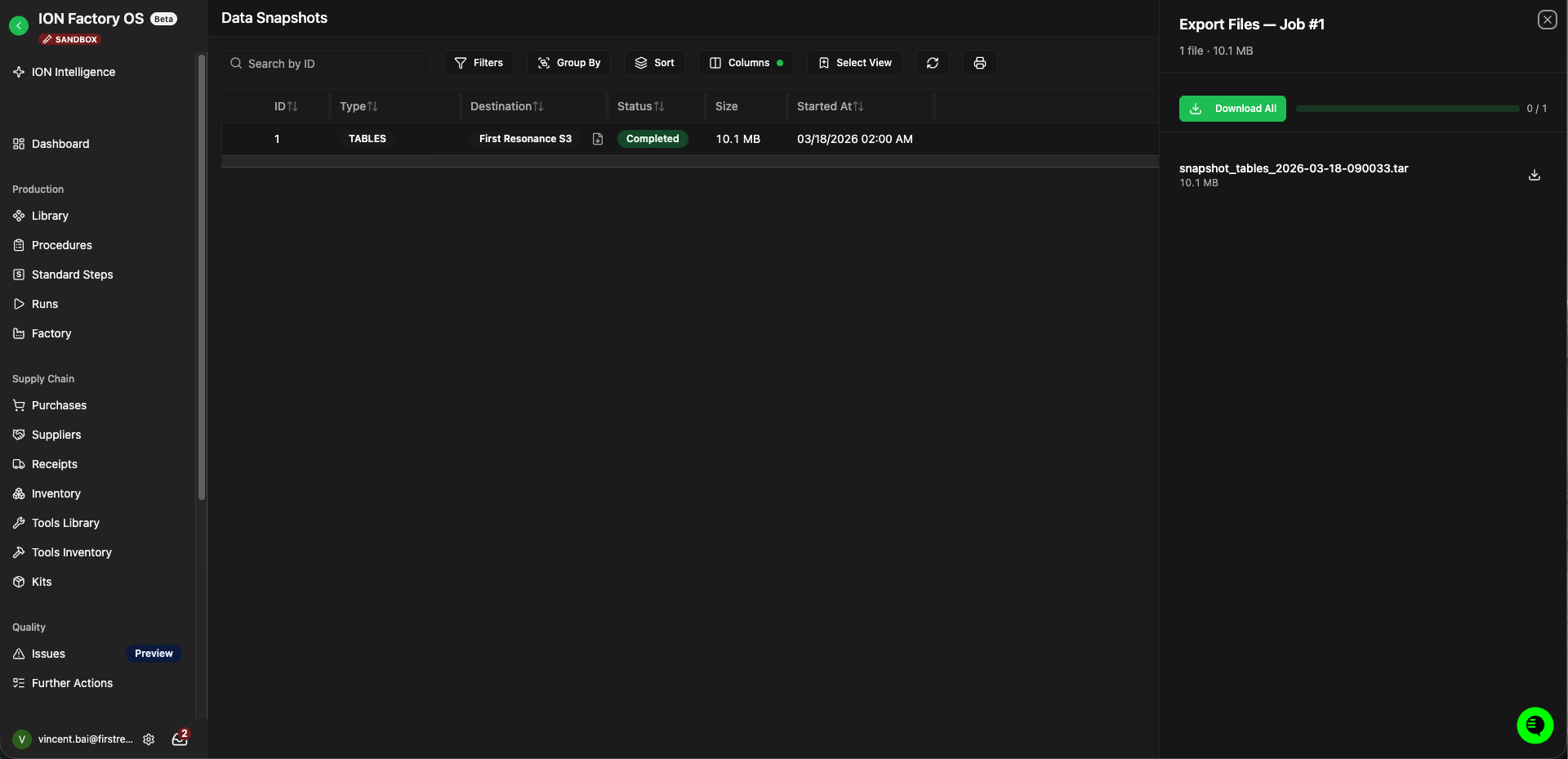
Once a snapshot completes, you can download the resulting files from the **data snapshots page**. You can also track the status of all snapshots from the snapshot history table.
{% hint style="warning" %}
The data snapshots page is only accessible to organization admins for security purposes. All snapshot data is encrypted at rest and in transit using TLS.
{% endhint %}
***
## What You Receive
Snapshots are delivered as `.tar` archives. A tables snapshot contains one compressed file per table (`.csv.gz` or `.jsonl.gz`), and an attachments snapshot contains all uploaded files.
For large snapshots, ION automatically splits the output into multiple `.tar` files labeled with a part number (e.g., `snapshot_tables_part1_2026-03-31-143022.tar`, `snapshot_tables_part2_2026-03-31-143022.tar`).
***
## Delivery Destinations
By default, snapshots are stored in ION and made available for download through the UI. Snapshots stored in ION are retained for **30 days**, after which they are automatically deleted.
{% hint style="success" %}
**Recommended:** Set up [Customer S3 Delivery](/platform/data-snapshots/customer-s3-delivery-setup.md) to have snapshots delivered directly to your own AWS S3 bucket. This gives you full ownership of the snapshot files, the ability to apply your own retention and access policies, and seamless integration with your existing data infrastructure.
{% endhint %}
***
## Scheduling
Snapshots can be scheduled to run weekly or monthly. Your account team will configure the cadence during onboarding.
***
## Onboarding
To get started with data snapshots:
1. **Contact your account team** -- Let us know you'd like to set up data snapshots and whether you need tables, attachments, or both.
2. **Choose a delivery destination** -- Snapshots can be downloaded from ION directly, or delivered to your own S3 bucket (recommended).
3. **Set up customer-managed S3 delivery** (if applicable) -- Follow the [Customer S3 Delivery Setup](/platform/data-snapshots/customer-s3-delivery-setup.md) guide to create your bucket, configure an IAM role, and share your configuration with us for validation.
4. **Go live** -- Once configured, snapshots run on your chosen schedule and are delivered automatically.
***
## Snapshot History
The data snapshots page shows the status of all snapshots for your organization:
| Status | Description |
| ----------- | -------------------------------------------------------------------------------- |
| Pending | The snapshot is waiting to be processed. |
| In Progress | The snapshot is currently running. |
| Completed | The snapshot finished successfully and files are available for download. |
| Failed | The snapshot encountered an error. Check the error details for more information. |
Data snapshots page with the download panel for a completed snapshot.
---
# Agent Instructions
This documentation is published with GitBook. GitBook is the documentation platform designed so that both humans and AI agents can read, navigate, and reason over technical content effectively. Learn more at gitbook.com.
## Querying This Documentation
If you need additional information that is not directly available in this page, you can query the documentation dynamically by asking a question.
Perform an HTTP GET request on the current page URL with the `ask` query parameter, and the optional `goal` query parameter:
```
GET https://manual-v2.firstresonance.io/platform/data-snapshots.md?ask=&goal=
```
`ask` is the immediate question: it should be specific, self-contained, and written in natural language.
`goal` is optional and describes the broader end goal you are ultimately trying to accomplish on behalf of the user. GitBook uses it to tailor the answer towards what is most useful for that goal.
The response will contain a direct answer to the question and relevant excerpts and sources from the documentation.
Use this mechanism when the answer is not explicitly present in the current page, you need clarification or additional context, or you want to retrieve related documentation sections.