Disposition Types

Configure issue disposition types and control whether associated inventory stays available, becomes unavailable, or is permanently blocked.

Overview

Disposition types define how inventory should be handled when it is associated with an issue. Each disposition type includes an Availability Behavior setting that determines whether the linked inventory remains available right away, becomes unavailable until the issue is resolved, or is made permanently unavailable.

This behavior lets quality teams match inventory control to the actual intent of the disposition. For example, a "Use As Is" disposition may leave inventory available immediately, while a "Rework" disposition may temporarily hold the inventory until the issue is resolved, and a "Scrap" disposition may keep it permanently unavailable.

Availability Behavior

Each disposition type can be configured with one of these availability behaviors:

Availability Behavior
What Happens to Associated Inventory

Available Immediately

Inventory remains in its current available state after being associated with the issue.

Release on Resolve

Inventory is set to Unavailable while the issue is open, then can return to normal availability when the issue is resolved.

Permanently Unavailable

Inventory is set to Unavailable when associated with the issue and stays unavailable as part of the disposition outcome.

Default Availability Behavior

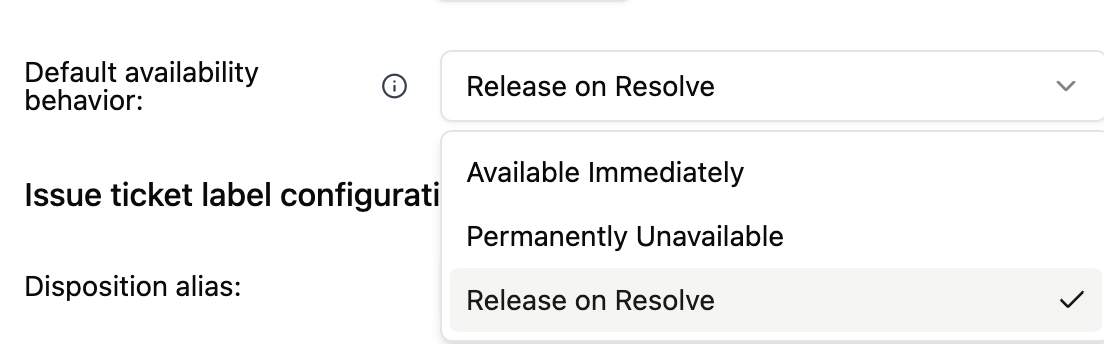
Organizations can also set a default availability behavior from Settings > Issues. This default is used when creating or editing disposition types so teams have a consistent starting point.

Default availability behavior in Issue Settings.
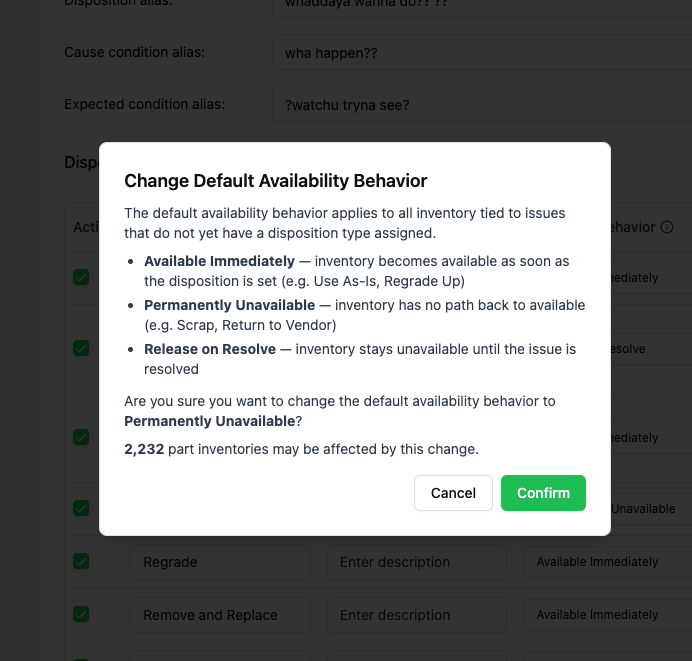
Changing the org-level default availability behavior.

Status Exceptions

Availability behavior does not affect every inventory status. Inventory that is already in one of these statuses is not changed by issue association:

  • Installed

  • Work In Progress (WIP)

  • Scrapped

These exceptions prevent issue workflows from overwriting statuses that already reflect a stronger lifecycle state.

Configuring Disposition Types

Go to Settings > Issues to manage disposition types. Each row in the Disposition Types table includes:

  • Active to control whether the disposition can be used

  • Title for the user-facing name

  • Description for internal guidance

  • Availability Behavior to control inventory status changes for inventory associated with issues using that disposition

Disposition Types settings, including the Availability Behavior column.
Editing a disposition type's availability behavior.

Common Disposition Types

The right behavior depends on how your team wants inventory to move through quality review. Typical examples:

Disposition Type
Recommended Availability Behavior
Why

Use As Is

Available Immediately

The issue is documented, but the inventory does not need to be held.

Rework to Print

Release on Resolve

The inventory should be held while rework is pending, then released after resolution.

Return to Vendor

Permanently Unavailable

The inventory should no longer be available for internal use.

Scrap

Permanently Unavailable

The inventory should never return to available stock.

Await Engineering Review

Release on Resolve

The inventory should be held until a decision is made.

End-to-End Behavior

The full inventory flow works like this:

  1. Inventory is associated with an issue.

  2. The issue's disposition type determines the applicable Availability Behavior.

  3. If the behavior is Release on Resolve or Permanently Unavailable, the inventory status changes to Unavailable unless it is already Installed, WIP, or Scrapped.

  4. If the behavior is Available Immediately, the inventory remains available.

  5. When the issue is resolved, inventory held under Release on Resolve can be released from Unavailable according to the issue outcome.

  6. Inventory marked by Permanently Unavailable remains unavailable as part of the final disposition.

For the workflow that links inventory to issues, see Contain Affected Inventory. For the inventory lifecycle and status definitions, see Inventory.

Last updated

Was this helpful?